
How to Start a Webcam Site

Short answer: build it from scratch, hire developers for months, or launch a proven turnkey pay-per-minute video chat platform in days — on your own domain, with your own users, content and rules.

Start with a Free Consultation

See Live Demo Get Started

Hosted turnkey plans from $100/mo · Free core plugin on WordPress.org · Built on WordPress by VideoWhisper since 2008
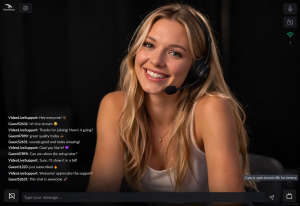
Broadcaster view of HTML5 videochat with live text chat alongside video

Broadcaster view: performer streams live from the browser with real-time text chat alongside video — no app or download required.

Most new site owners skip the build-from-scratch route entirely. A turnkey pay-per-minute video chat platform gets you through every step below at once — live in days, not months, on your own domain.

5 Steps to Start a Webcam Site

  1. Pick your niche and business model. Adult cam site, expert/consulting platform, coaching, psychic readings, fitness — the same pay-per-minute (PPM) or pay-per-view (PPV) mechanics work across all of them. Decide upfront: subscriptions, pay-per-minute calls, tips/gifts, or a mix.
  2. Choose build-your-own vs. turnkey. Custom development (WebRTC signaling, billing, performer dashboards, moderation) typically costs tens of thousands of dollars and months of engineering before your first paying customer. A turnkey script gets the same core features live immediately, so you can spend your time on marketing and traffic instead.
  3. Set up the live video technology. You’ll need HTML5 WebRTC for live streaming/2-way calls, or RTMP/HLS for one-to-many broadcasts, plus hosting that can handle concurrent video connections at scale.
  4. Wire up billing and payouts. Token wallets, micropayments, and a real mix of gateways (cards, PayPal, crypto) matter more than any single feature — performers and clients won’t stay on a platform that can’t reliably bill and pay out.
  5. Launch, register your first performers/clients, and market. The fastest-growing sites launch with a small group of provider accounts already lined up, then use their own domain and content ownership as the pitch for switching from marketplace apps that take a cut of every session.
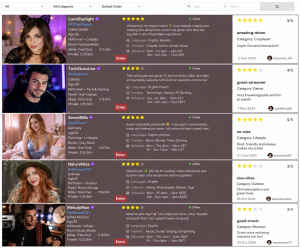
Row/list browse view of live performers with ratings and categories

Row browse view: visitors browse live performers with ratings, categories and quick info before entering a room.

The Fast Way: A Turnkey Pay-Per-Minute Video Chat Platform


PaidVideoChat is a complete WordPress script and turnkey technical solution built by VideoWhisper (running production video sites since 2008) that gets you through all 5 steps above at once:

  • 100% web-based HTML5 videochat — no app store approval, no downloads
  • Private 2-way pay-per-minute calls, public group shows, and video conferencing
  • Token wallet with PayPal, CCBill, Stripe, Skrill, NETbilling, Zombaio, BitPay, and all WooCommerce gateways
  • Performer/client/studio registration, AJAX live listings, tips/gifts with goals, paid questions, creator subscriptions
  • Runs on WordPress — your own domain, your own database, your own content and terms

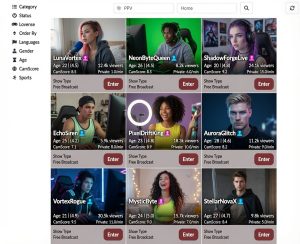
Grid browse view of live rooms with viewer counts and Enter buttons Grid browse view: live rooms shown as cards with viewer counts, tags and a one-click Enter button.

Not sure which setup is right for you? If you’re weighing build-your-own vs. turnkey, which billing gateways fit your country, or how to structure pricing for your niche, talk it through with VideoWhisper directly — free, no obligation.

Start with a Free Consultation